
Editing blocks
The prompt is an editor. Enter sends a line whose braces balance and continues one whose braces are open, so a method or a class is typed in one go. Each new line copies the indentation of the line before it and steps in after an opening brace; a closing brace typed on a blank line steps out. The status bar says what Enter will do next.
.edit method as Name opens a copy of an existing method in the editor. Use .edit Name to return to it.
See Editing and comparing methods.
il[1]> .method int32 Twice(int32 n) { ...> ldarg n ...> ldc.i4 2stack before [int32] │ no locals │ 0 instructions │ editing 3 lines Enter continuesOnce the braces balance the hint changes, and Enter sends the block line by line. The transcript keeps every echo and every stack line, the same as if each line had been typed on its own.
il[1]> .method int32 Twice(int32 n) { ...> ldarg n ...> ldc.i4 2 ...> mul ...> ret ...> }stack unreachable │ no locals │ 0 instructions │ editing 6 lines Enter sends 6 linesil[1]> .method int32 Twice(int32 n) { method int32 Twice(int32 n)il[1]> ldarg n ┊ [int32]il[1]> ldc.i4 2 ┊ [int32, int32] ◂ topil[1]> mul ┊ [int32]il[1]> ret ┊ []il[1]> } end of method Twiceil[2]> ldc.i4 21 ┊ [int32]il[2]> call int32 Twice(int32) ┊ [int32]il[2]> ret = 42 : int32Up and Down move through the lines of the buffer and reach history only from its first and last
line; Ctrl+P and Ctrl+N walk history from any line. Shift with the arrows selects inside the
buffer, typing replaces the selection, and Ctrl+C copies it. When idle, Ctrl+C without a selection clears
the buffer and leaves an empty prompt open. Use Ctrl+Q or .quit to leave.
Editing remains available while the execution host starts, runs code, or restarts. Input typed during startup stays in the editor until you submit it after the host is ready. Completion and diagnostics use the last accepted source while a cell runs. You can prepare the next draft without running it; accepting a suggestion only edits that draft.
During execution, Ctrl+C requests interruption. If work cannot stop promptly, ilrepl shows a notice before accepting another Ctrl+C as permission to restart the runtime. See Keyboard and Restart and recovery.
Checking the stack
Section titled “Checking the stack”The status bar shows stack before for the instruction at the caret. It follows the whole body,
so a branch below the caret can change that stack. On an insertion line it shows the incoming
stack; declarations do not claim an instruction stack.
F1 explains the diagnostic at the caret, the selected completion, or the current instruction. It shows the expected operands, the incoming stack from bottom to top, and the source of conflicting values. At a branch join, incoming paths are shown separately. Unknown, incomplete, unreachable, and unverifiable results remain distinct; unavailable evidence is identified explicitly.
Help uses the whole terminal, including on short screens. Escape or F1 returns to the same buffer, selection, and undo history. Tab selects a producer or documentation link and Enter opens it. Previous help stays dimmed while its replacement is being checked, with navigation disabled.
A compact diagnostic explains a conflicting join, missing target, or invalid instruction.
F8 moves to the next finding and Shift+F8 moves back. Corrections update the stack and clear
resolved findings. Completion uses the same incoming stack. .show and .dis retain the full
explanations and related locations; earlier transcript echoes stay as they were when accepted.
Pasting
Section titled “Pasting”A paste lands in the editor and waits for Enter, so the block below, from Methods, can be checked before it goes.
...> ldc.i4 2 ...> sub ...> call int32 Fib(int32) ...> add ...> ret ...> BASE: ldarg n ...> ret ...> }stack unreachable │ no locals │ 0 instructions │ editing 17 lines Enter sends 17 linesThe excerpt above shows the last rows of the pasted Fibonacci method. The editor shows the rows that fit, up to a third of the screen, and scrolls to keep the caret in view. Only the newline the clipboard adds at the end is dropped; every other blank line is yours. Inside a block a blank line is skipped, at the top level it runs the cell, as it does when typed, and a line that is only a comment is echoed and ignored. Pasted text keeps its own indentation.
A refused line
Section titled “A refused line”When the engine refuses a line, the block it belongs to is withdrawn, the method or class it opened is abandoned, and the whole block comes back with the offending line selected. A later branch can expose an error on an earlier line; that earlier line is selected. A line on its own is not put back: the error is in the transcript and Up recalls the line. In a paste of separate lines, the ones after the refused line never went, and they come back.
il[3]> .method int32 Half(int32 n) { method int32 Half(int32 n)il[3]> ldarg n ┊ [int32]il[3]> lcd.i4 2 error: unknown opcode 'lcd.i4' (did you mean 'ldc.i4'?) method Half abandoned; the block is back in the editorerror on line 3: unknown opcode 'lcd.i4' (did you mean 'ldc.i4'?)il[3]> .method int32 Half(int32 n) { ...> ldarg n ...> lcd.i4 2 ...> div ...> ret ...> }stack [int32] │ no locals │ 0 instructions │ editing 6 lines Enter sends 6 linesTyping replaces the selected line, and the next Enter sends the block again from a clean state.
Ctrl+C on a returned block clears it; the engine was already put back. A block that has already
run or committed cannot be withdrawn: a cell that throws stays run and only the lines after it
come back, and a .undo, .clear, or .reset inside a block moves the point a later refusal
returns to, which the transcript notes.
il[3]> .method int32 Half(int32 n) { method int32 Half(int32 n)il[3]> ldarg n ┊ [int32]il[3]> ldc.i4 2 ┊ [int32, int32] ◂ topil[3]> div ┊ [int32]il[3]> ret ┊ []il[3]> } end of method HalfCtrl+C requests cancellation of the line in flight. Once it stops, ilrepl withdraws provisional input and returns its text to the editor. Completed cells and definitions stay applied. If user code cannot stop, confirm the runtime restart only after its notice appears; see Keyboard.
Comments and blank lines
Section titled “Comments and blank lines”A comment is removed before a line is read, wherever the line is, so a command inside a comment is text. A line that is only a comment is echoed and ignored, and a blank line at the top level runs the cell.
il[4]> ldc.i4 7 ┊ [int32]il[4]> // kept on the stackil[4]> = 7 : int32An unterminated /* keeps the buffer open, and the comment ends where */ does, lines later.
il[5]> /* a note ...>stack [] │ no locals │ 0 instructions │ editing 2 lines Enter continuesil[5]> /* a noteil[5]> that goes on */ ldc.i4 3 ┊ [int32]il[5]> ret = 3 : int32History
Section titled “History”Every submission is one history entry, a refused block and its corrected version each on their own, and Up brings a block back whole with the caret at its end.
il[6]> .method int32 Half(int32 n) { ...> ldarg n ...> lcd.i4 2 ...> div ...> ret ...> }stack unreachable │ no locals │ 0 instructions │ editing 6 lines Enter sends 6 linesHistory is kept between runs in ~/.config/ilrepl/history, or under $XDG_CONFIG_HOME when
that is set, and under LocalApplicationData on Windows. The file is the one pgcli writes: a
# line with the time, then each line of the entry after a +. It is only ever appended to,
under a lock file beside it, so two sessions never write over each other; the newest thousand
entries are loaded. --no-history runs without it.
Completion
Section titled “Completion”Completion reads what you have written earlier in the buffer, including method parameters and types that have not been submitted yet.
While new matches are being checked, the previous rows stay dimmed under an updating title.
Arrow selection and detail scrolling remain available. Insertion waits for the new results.
If running code loads another assembly in the background, the prompt refreshes its suggestions
without an edit. Types whose short names become ambiguous are offered with qualified names.
Accepting a suggestion during that refresh waits for a matching current result. Editing or
moving the caret cancels the pending completion.
The palette shows each overload with its stack effect and full signature:
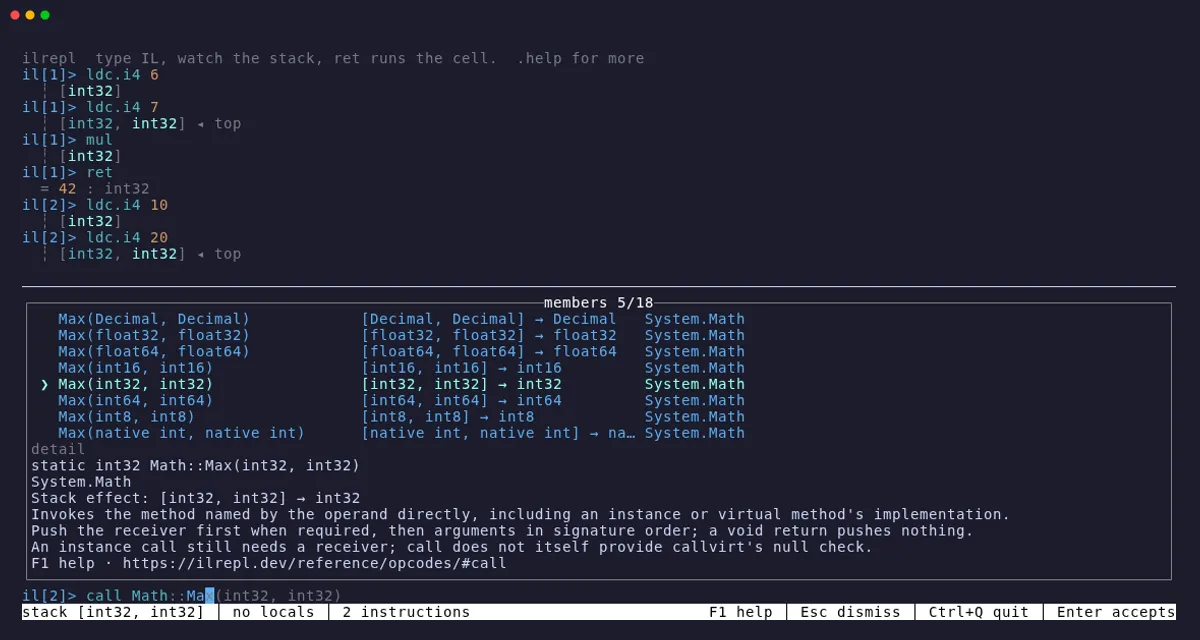
Inside a method, type call Ma, complete Math, then type Ma after the inserted ::.
Use Down to select the overload taking two int32 values. The Quick start recording
shows Tab completion in a running session.
Tab inserts the selected signature. Here is the finished block and a call to it, starting with
.reset to clear the earlier examples:
il[6]> .reset cell, declarations, methods, and types clearedil[6]> .method int32 Larger(int32 a, int32 b) { method int32 Larger(int32 a, int32 b)il[6]> ldarg a ┊ [int32]il[6]> ldarg b ┊ [int32, int32] ◂ topil[6]> call Math::Max(int32, int32) ┊ [int32]il[6]> ret ┊ []il[6]> } end of method Largeril[7]> ldc.i4 6 ┊ [int32]il[7]> ldc.i4 7 ┊ [int32, int32] ◂ topil[7]> call Larger ┊ [int32]il[7]> ret = 7 : int32Generic definitions continue argument by argument. Complete call Array::Empt to
call Array::Empty<; the palette names argument 1 of 1, T. Complete str to string,
type >, then Tab inserts (). The resulting call Array::Empty<string>() binds the
definition you selected. Nested generic arguments retain their outer selection while you edit.
Colours
Section titled “Colours”One tokenizer lights the buffer, the echo, and the listings from .show, .dis, and .il, so
a line reads the same everywhere it appears. Opcodes, directives, commands, keywords, types,
members, strings, numbers, labels, and comments each have a colour, and a first word the engine
would refuse is underlined before Enter is pressed.